![Dispenza-Revised-BlackLogo-041123-1.png]](https://faq.dispenza.com/hs-fs/hubfs/Dispenza-Revised-BlackLogo-041123-1.png?height=40&name=Dispenza-Revised-BlackLogo-041123-1.png)
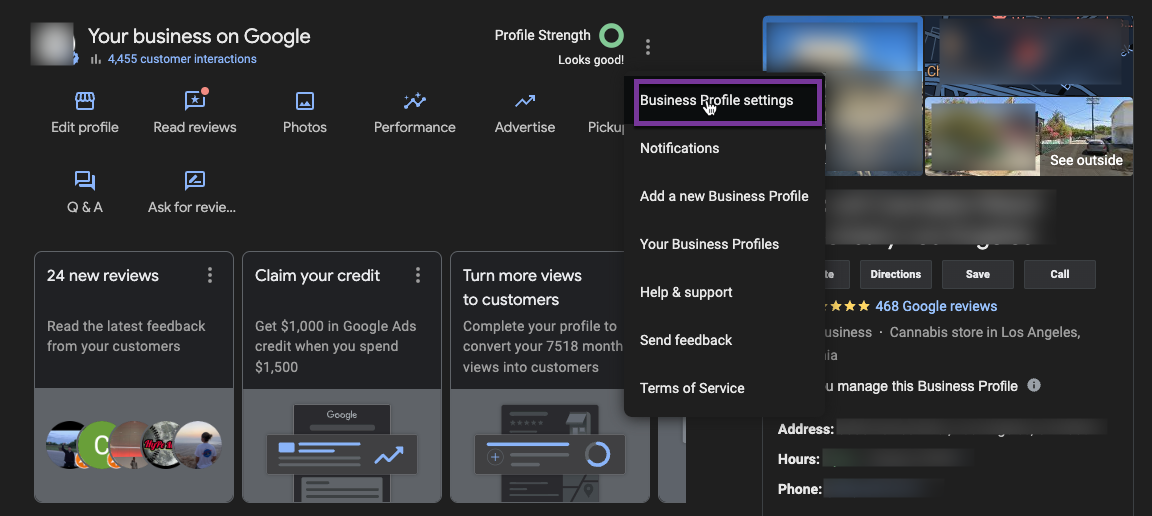
Steps:
- Login to Business.google.com with your email that is an owner of the Google Business Profile
- Go to your Business Profile. Learn how to find your profile.
- Click Menu
Business Profile settings
- At the top left, click Add
.
- Enter a name or email address.
Email: bp@dispenza.com - Under "Access," choose Owner or Manager.
Access: Manager - Click Invite.
- Invite the following user to all business profiles we will be managing
